Posts

Magento 2 Import Scripts

Magento 2 Import Scripts Simple and faster way to import data scripts for magento 2. https://github.com/Extrembler/Magento-2-Import-Scripts Keep your self updated by subscribing our website so whenever we update with new import scripts we can inform you. #import #importmagento2 #magento2 #simpleimport  If like efforts, Please share, comment and subscribe for future posts and inspire more.

Popup Before Add to Cart - Magento

Image
Magento is very big e-commerce platform which support various functionality by extension , also called as module. In this blog, we will see an unique functionality "Popup before Add to cart". Essentially, while adding product to cart website owner need to show some content for marketing purpose or anything else. This extension exactly made for same functionality. It will show content before adding product to cart. Extrembler CartBeforePopup v 1.0.0 Another question is that, What if website owner need to show CMS block content on popup. Don't worry , our team has already taken care of that. An extension provide functionality to user where he/she can choose any cms block from system or simple text content based on choice. One of the major benefit of the module, easily disable and enable functionality without disabling the module. Find out more information below. Features: 1. Easy installation. 2. Manageable content. 3. Easy selection of CMS ...

Magento 2.2 and PHP 7.2

Image
Are you facing issues after upgrading magento 2.2 to PHP 7.2?  Follow below steps to resolve the same. Migrating Magento 2.2 to server with PHP version 7.2 , many issues faced and so we have approached many files to solve this. Keep patient and follow steps one by one.  1) PHP 7.2 does not contain 4 the mcrypt extension 8. In Debian pecl install mcrypt-snapshot In Windows composer require phpseclib/mcrypt_compat:* 2) Warning: ini_set(): A session is active. You cannot change the session module’s ini settings at this time in lib/internal/Magento/Framework/Session/SessionManager.php on line 129 Replace the lines: lib/internal/Magento/Framework/Session/SessionManager.php #Line128-Line129 // Enable session.use_only_cookies ini_set(‘session.use_only_cookies’, ‘1’); with the following ones: if (!$this->isSessionExists()) {  // Enable session.use_only_cookies  ini_set(‘session.use_only_cookies’, ‘...

Magento 2 Order Comment Editor

Image
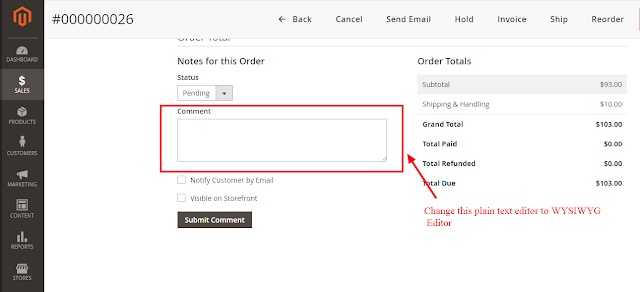
Magento 2 Order Comment Editor Do you need order comment without plain text? Not an issue we have an extension for you guys. We always write sweet and short blog to make guys understand simply, so let's begin. As shown in above screen shot change comment plain text editor to WYSIWYG editor. Extrembler    Order Comment Editor   V  0.1.0 Features: 1. Modify plain comment editor to  WYSIWYG editor. 2. Easy to installation. Benefits: 1. Open source so anybody can modify as per needs. 2. Easy installation.  3. Less coded for better efficiency. 4. Trouble-free customization. If like efforts, Please share, comment and subscribe for future posts and inspire more.

How to setup CGST, SGST & GST in Magento 2?

Image
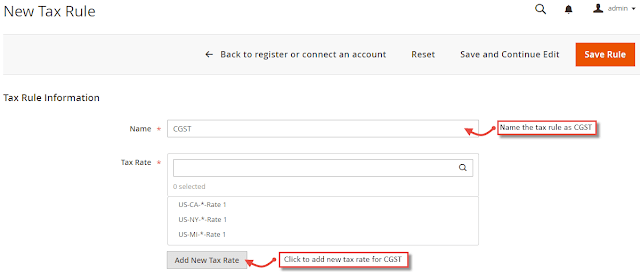
How to setup CGST, SGST & GST in Magento 2? Without Wasting Time Let's Roll. STEPS:  1) Create  SGST, CGST and IGST tax rules.        First of all go to Stores > Taxes > Tax Rules . Click on  "Add New Tax Rule" button. 2)  While creating SGST and CGST  set the rate to 2.5%. For each state you need to set create and set this. 3) From Additional Settings , create product tax class named GST and select the same for all three CGST , SGST and IGST Rules. 4)  Create tax rules and rates for SGST and IGST. 5) CGST , SGST and IGST  tax rates are under Stores > Taxes > Manage Tax Zones & Rates .  6) Now most crucial step comes. Please pay attention on this point.  Display GST taxes separately in all the order documents, you have to customize the code as default Magento 2 system does not provide the functionality.  ...

Magento 2 Product Attribute Tooltip

Image
 Magento 2 Product Attribute Tooltip? Are you looking for Magento 2 Product Attribute Tooltip? Don't worry we have found a solution for you. One is full free and other one paid one. So Let's begin the journey for tooltip. FREE FREE FREE Developer named DaniĆ«l van der Linden has developed this module. We have personally used this extension and we have found good this for swatch tooltip. We just love the name he has given namespace " Spaggel" . Find more about from here.  Spaggel_Tooltip Install Run  composer require spaggel/tooltip  to install the latest release. Functionality Support for tooltips on: Product attributes table (product view page) Configurable swatches (product view page) Screenshots Product information: Closed: Opened: Configurable product swatch: Closed: Opened: Todo : Add support for:  Layered navigation attributes  CMS variables (e.g. {{store url}})  Work in ...

How WordPress CMS is different than Magento?

Image
We have been checking different CMS systems last week and we loved one of the technology from Wordpress. So what wordpress has which is not in Magento. That is " Gutenberg ". We must say we just fall in love with  Gutenberg.  Let's see What is Gutenberg and what it provides. Blocks: Create once and use any where on any page. Most Used:  Recently used block, which user can use over time. Common Blocks: Simple used blocks like Image, Paragraph, Heading, Gallery, List, Quote,Audio, Video, Cover, File included in this section. Formatting: Classic, Custom HTML,Table,Code, Verse, PullQuote, and Perfomatted. Layout Elements: Buttons, Columns, Media and Text, More, Page break, Separator, Spacer available to use for users from here. Widgets: Archives, Categories, Latest Comments and Latest Posts include on any page from here. Embeds: Various Facebook, Twitter, YouTube,Instagram etc embed code add from this section. Let's Have a Quic...