Posts

Showing posts with the label Magento 2

How to use Zend log Magento 2

 To use Zend log use below code in any PHP file. $yourmessageString = 'Hey from magento zend log'; $yourmessageArray = ['Hey from magento zend log Array ']; $writer = new \Zend\Log\Writer\Stream(BP . ‘/var/log/custom.log’); $logger = new \Zend\Log\Logger(); $logger->addWriter($writer); $logger->info($yourmessageString); $logger->info(print_r($yourmessageArray,true)); //for array and objects
How to add product attribute value in minicart magento 2

How to add product attribute value in minicart magento 2? First need to do is create a plugin so add plugin at di.xml at first. di.xml <config xmlns:xsi="http://www.w3.org/2001/XMLSchema-instance" xsi:nonamespaceschemalocation="urn:magento:framework:ObjectManager/etc/config.xsd"> <type name="Magento\Checkout\CustomerData\DefaultItem"> <plugin disabled="false" name="AddAttPlug" sortorder="10" type="Your\Module\Plugin\DefaultItem"> </plugin></type> </config> Now create a plugin class and below line of code.   Default.php <?php namespace Your\Module\Plugin; use Magento\Quote\Model\Quote\Item; class DefaultItem { public function aroundGetItemData($subject, \Closure $proceed, Item $item) { $data = $proceed($item); $product = $item->getProduct(); $atts = [ "product_weight" => $product->ge...

Understand Magento type node and how to use for own benefits.

Hey folks, Today we will going to learn fundamental of < type /> node which used in di.xml. So let's start without time waste let's talk about <type />  node. To understand this concept we will use an example for that we will create sample module. So let's do this together.  If you already know how to create a module you can skip this intro. To create a module there is two files are required. registration.php module.xml So let's create a registration.php path :  app/code/Extrembler/Base \Magento\Framework\Component\ComponentRegistrar::register( \Magento\Framework\Component\ComponentRegistrar::MODULE, 'Extrembler_Base', __DIR__ ); Second we need to create module.xml path : app/code/Extrembler/Base/etc <?xml version="1.0"?> <!-- /** * @category Extrembler * @package Extrembler_Base * @author Extrembler <gaurangpadhiyar1993@gmail.com> */ --> <config xmlns:xsi="http://www...

Magento 2.3.2 - Export Error

Image
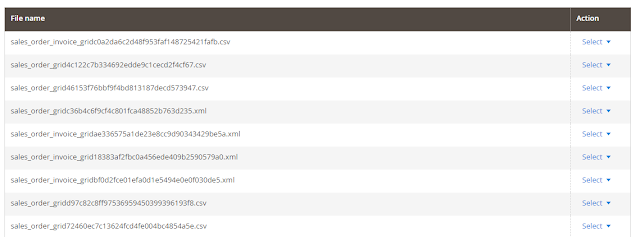
Have you just upgraded to Magento version 2.3.2? Have an error on export? Than you are at right place for a solution. So without wasting time , let's roll the camera. Error: Warning: DOMDocumentFragment::appendXML(): Entity: line 1: parser error : CData section too big found in vendor/magento/framework/View/TemplateEngine/Xhtml/Template.php on line 60 Preconditions (*) Magento version 2.3.2 Too big files and number of files more (around > 20000) Steps to reproduce (*) Login Admin panel Go to System -> Export Expected result (*) 1) 2) Warning: DOMDocumentFragment::appendXML(): Entity: line 1: parser error : CData section too big found in vendor/magento/framework/View/TemplateEngine/Xhtml/Template.php on line 60 You have error as described than below solution for your store. 1)  export_grid.xml      vendor/magento/module-import-export/view/adminhtml/ui_component/export_grid.xml <?xml versi...

Magento 2 Import Scripts

Magento 2 Import Scripts Simple and faster way to import data scripts for magento 2. https://github.com/Extrembler/Magento-2-Import-Scripts Keep your self updated by subscribing our website so whenever we update with new import scripts we can inform you. #import #importmagento2 #magento2 #simpleimport  If like efforts, Please share, comment and subscribe for future posts and inspire more.

Magento 2 Order Comment Editor

Image
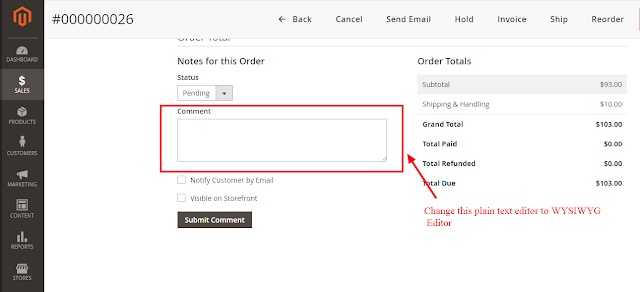
Magento 2 Order Comment Editor Do you need order comment without plain text? Not an issue we have an extension for you guys. We always write sweet and short blog to make guys understand simply, so let's begin. As shown in above screen shot change comment plain text editor to WYSIWYG editor. Extrembler    Order Comment Editor   V  0.1.0 Features: 1. Modify plain comment editor to  WYSIWYG editor. 2. Easy to installation. Benefits: 1. Open source so anybody can modify as per needs. 2. Easy installation.  3. Less coded for better efficiency. 4. Trouble-free customization. If like efforts, Please share, comment and subscribe for future posts and inspire more.

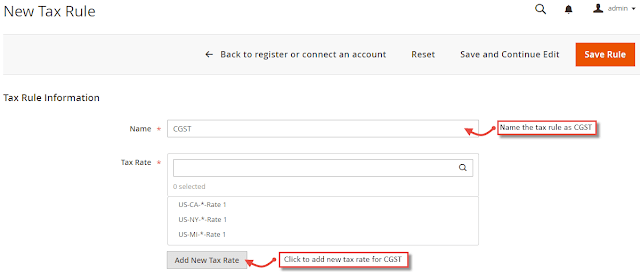
How to setup CGST, SGST & GST in Magento 2?

Image
How to setup CGST, SGST & GST in Magento 2? Without Wasting Time Let's Roll. STEPS:  1) Create  SGST, CGST and IGST tax rules.        First of all go to Stores > Taxes > Tax Rules . Click on  "Add New Tax Rule" button. 2)  While creating SGST and CGST  set the rate to 2.5%. For each state you need to set create and set this. 3) From Additional Settings , create product tax class named GST and select the same for all three CGST , SGST and IGST Rules. 4)  Create tax rules and rates for SGST and IGST. 5) CGST , SGST and IGST  tax rates are under Stores > Taxes > Manage Tax Zones & Rates .  6) Now most crucial step comes. Please pay attention on this point.  Display GST taxes separately in all the order documents, you have to customize the code as default Magento 2 system does not provide the functionality.  ...

Magento 2 Product Attribute Tooltip

Image
 Magento 2 Product Attribute Tooltip? Are you looking for Magento 2 Product Attribute Tooltip? Don't worry we have found a solution for you. One is full free and other one paid one. So Let's begin the journey for tooltip. FREE FREE FREE Developer named Daniël van der Linden has developed this module. We have personally used this extension and we have found good this for swatch tooltip. We just love the name he has given namespace " Spaggel" . Find more about from here.  Spaggel_Tooltip Install Run  composer require spaggel/tooltip  to install the latest release. Functionality Support for tooltips on: Product attributes table (product view page) Configurable swatches (product view page) Screenshots Product information: Closed: Opened: Configurable product swatch: Closed: Opened: Todo : Add support for:  Layered navigation attributes  CMS variables (e.g. {{store url}})  Work in ...

Magento 2 Installation Problems and Solutions

Magento 2 Installation Problems and Solutions Even after Magento 2 launched successfully still so many persons having a problem in an installation. So without wasting time , let's find out the issues and it's possible solutions. 1) PHP Version Error. Easy Solution of it is , just upgrade or downgrade PHP version as per suggestion on screen. 2) Composer not installed. Install the composer on root of the Magento 2 directory. Windows Installation :   Download the composer fro m   here . Command Installation:  php -r "copy('https://getcomposer.org/installer', 'composer-setup.php');" php -r "if (hash_file('sha384', 'composer-setup.php') === '93b54496392c062774670ac18b134c3b3a95e5a5e5c8f1a9f115f203b75bf9a129d5daa8ba6a13e2cc8a1da0806388a8') { echo 'Installer verified'; } else { echo 'Installer corrupt'; unlink('composer-setup.php'); } echo PHP_EOL;" php composer-setup.php php -r ...

Why you need to upgrade to Magento 2.3

Image
Why you need to upgrade to Magento 2.3 Just in last week magento has finally released version 2.3 with new feature and technology. What’s new in this , let’s find out. Best thing introduced in version is PWA STUDIO. Have you a question in mind What is PWA? Progressive Web App (PWA) is technology by which E-commerce owner can boost their website conversation ratio for mobile users. With PWA, App users (Amazon App) almost gone. Why gone? The simple answer is that PWA give give Application user experience. It’s good for no storage but feel like using an Application. So basically if i say, “Use XXX mobile but you feel like an iPhone.” Just kidding. To find out more about it read here . Next good thing introduced is Page Builder. Page builder is very useful for non-technical users. Drag and Drop, move html section from right to left, change width and height, make html page 2 rows to 3 rows, three columns to one column, easily create button and remove etc. Create and...

Magento and Exam Preparation

Image
Last few days, so many magento developer emails us and asked us 'What to read for Magento Examination?'. Well, There are plenty of sources available on the web but still we will suggest some good sources for Magento examination.We have gathered many information but we are only summarizing over here from all data. Links can help: Magento Notes Dev Docs Magento For Magento 2 things need to check before exam: Magento architecture, Magento Composer. Models, data access, repositories, data searches. Magento system requirements (Linux, Apache/Nginx, Redis, etc.) Best practices, extending core functionality, plugins, preferences, overrides XML layouts, blocks, layout handles, UI components. API, creating new endpoints, usage of interfaces, authentication. If like efforts, Please share, comment and subscribe for future posts and inspire more.

Hosting and Goodies

Image
Magento 2 Hosting , but where to? Are you thinking to build to Magento 2 website? You have planned everything but confused about hosting. Don't worry we will have thoughts for you from where you can choose better hosting. Note : All hosting provider prices are as per October 2018. 1) Milesweb   Miles web is the very very good hosting company which we personally recommending. We have hosted many Magento and other framework website. 2) Hostgator India's leading hosting provider is Hostgator.  it is one of the good hosting provider. We have used Hostgator services in past and we have good experience with them. 3) GoDaddy GoDaddy is world wide known hosting provider. 4) Cloudways Cloudways gives more options with different hosting services. That makes it an unique. 5) a2hosting An a2hosting is another good hosting provider for magento framework. Although it prices are high but it still takes a place in our top 5 hosting provider. ...

Magento 2 - Open Orders

Image
Open Orders Magento is a great platform to build e-commerce website. It provides you all basic functionality for an e-commerce website need. At earlier stage of the website, number of orders are less for any customer. But as with time website become famous for buying stuff, it will become very difficult to handle orders due to number of orders increase and customers also take leap breakthrough. Well, Magento has great functionality called extension. An ERP extension available to handle all that order system. We will talk about good ERP modules later some time, let's talk about Open Orders. So what meant by Open Order ? Definition as per extrembler team :  All those orders which are not shipped yet are consider as open orders . Sometimes, it become hard to distribute orders which are open and under shipping progress. From admin side it is very easy to distribute those order using grid filtration but what about customers. So we are here with functionality calle...