Posts

Magento Currency Symbol

Image
Magento Currency Symbol Do want to change look of currency or fronted display symbol or do not want a symbol at all? If yes, you landed at correct place to while searching for a solutions. We are bringing a extension solution for you guys so without help of developer you can change look of currency symbol. Extension which we have developed. Currency Symbol - By Extrembler Features Easily enable/disable functionality Simply set currency symbol from pre-defined options Multi-store compatibility Enable/disable module store wise Change behaviours of currency symbol store wise Remove Currency Symbol using option no symbol Comes With Free Lifetime Updates 100% Open Source Multi-Store Supported Support If you have any questions about this extension, you can  Contact Us . If like efforts, Please share, comment and subscribe for future posts and inspire more.

Magento 2.3.3 Realease Notes - Features and Enhancement

Image
New release include 170 functional fixed by Magento team and community contributors in core product. A major change regarding security enhancement made in Magento 2.3.3. As per official statement from Magento release notes 75 security enhancements made. There are several changes so let's categories them and go on trip of Magento 2.3.3. Security enhancements Platform upgrades Infrastructure improvements Inventory Management enhancements Vendor-developed extension enhancements Magento Shipping Performance boosts Merchant tool enhancements GraphQL PWA Studio Google Shopping ads Channel Backward-incompatible Changes Security enhancements Improvements in core payment methods which are now compliant with PSD2 regulations. PSD = Payment Services Directive. A major PSD2 change is in Braintree payment. Now Magento version 2.3.3 can verfiy Braintree payment transactions by native Braintree 3D Secure 2.0 service. Authorize.net introduced "c...

Magento 2.3.2 - Export Error

Image
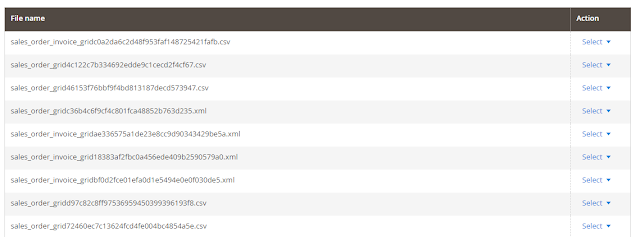
Have you just upgraded to Magento version 2.3.2? Have an error on export? Than you are at right place for a solution. So without wasting time , let's roll the camera. Error: Warning: DOMDocumentFragment::appendXML(): Entity: line 1: parser error : CData section too big found in vendor/magento/framework/View/TemplateEngine/Xhtml/Template.php on line 60 Preconditions (*) Magento version 2.3.2 Too big files and number of files more (around > 20000) Steps to reproduce (*) Login Admin panel Go to System -> Export Expected result (*) 1) 2) Warning: DOMDocumentFragment::appendXML(): Entity: line 1: parser error : CData section too big found in vendor/magento/framework/View/TemplateEngine/Xhtml/Template.php on line 60 You have error as described than below solution for your store. 1)  export_grid.xml      vendor/magento/module-import-export/view/adminhtml/ui_component/export_grid.xml <?xml versi...

Magento 2 Import Scripts

Magento 2 Import Scripts Simple and faster way to import data scripts for magento 2. https://github.com/Extrembler/Magento-2-Import-Scripts Keep your self updated by subscribing our website so whenever we update with new import scripts we can inform you. #import #importmagento2 #magento2 #simpleimport  If like efforts, Please share, comment and subscribe for future posts and inspire more.

Popup Before Add to Cart - Magento

Image
Magento is very big e-commerce platform which support various functionality by extension , also called as module. In this blog, we will see an unique functionality "Popup before Add to cart". Essentially, while adding product to cart website owner need to show some content for marketing purpose or anything else. This extension exactly made for same functionality. It will show content before adding product to cart. Extrembler CartBeforePopup v 1.0.0 Another question is that, What if website owner need to show CMS block content on popup. Don't worry , our team has already taken care of that. An extension provide functionality to user where he/she can choose any cms block from system or simple text content based on choice. One of the major benefit of the module, easily disable and enable functionality without disabling the module. Find out more information below. Features: 1. Easy installation. 2. Manageable content. 3. Easy selection of CMS ...

Magento 2.2 and PHP 7.2

Image
Are you facing issues after upgrading magento 2.2 to PHP 7.2?  Follow below steps to resolve the same. Migrating Magento 2.2 to server with PHP version 7.2 , many issues faced and so we have approached many files to solve this. Keep patient and follow steps one by one.  1) PHP 7.2 does not contain 4 the mcrypt extension 8. In Debian pecl install mcrypt-snapshot In Windows composer require phpseclib/mcrypt_compat:* 2) Warning: ini_set(): A session is active. You cannot change the session module’s ini settings at this time in lib/internal/Magento/Framework/Session/SessionManager.php on line 129 Replace the lines: lib/internal/Magento/Framework/Session/SessionManager.php #Line128-Line129 // Enable session.use_only_cookies ini_set(‘session.use_only_cookies’, ‘1’); with the following ones: if (!$this->isSessionExists()) {  // Enable session.use_only_cookies  ini_set(‘session.use_only_cookies’, ‘...

Magento 2 Order Comment Editor

Image
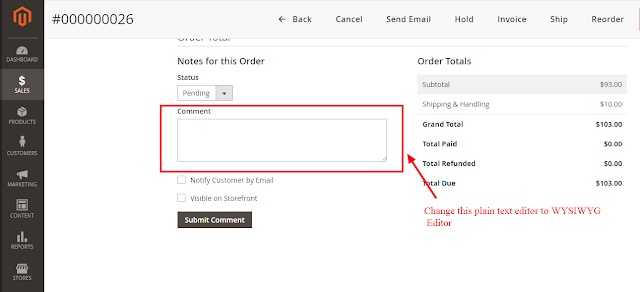
Magento 2 Order Comment Editor Do you need order comment without plain text? Not an issue we have an extension for you guys. We always write sweet and short blog to make guys understand simply, so let's begin. As shown in above screen shot change comment plain text editor to WYSIWYG editor. Extrembler    Order Comment Editor   V  0.1.0 Features: 1. Modify plain comment editor to  WYSIWYG editor. 2. Easy to installation. Benefits: 1. Open source so anybody can modify as per needs. 2. Easy installation.  3. Less coded for better efficiency. 4. Trouble-free customization. If like efforts, Please share, comment and subscribe for future posts and inspire more.